English
Cloudflare cf CLI: what cf migrate changes in a Wrangler project

Wrangler, the command-line tool that deploys Cloudflare Workers, has a successor. On September 28, 2026, Cloudflare released cf, a command-line interface (CLI) generated from the schema of its API, as an open beta. When the beta is over, Wrangler gets one last major version that points to cf, and then 18 months of maintenance.
The announcement gives no date for the end of the beta. On the same day Cloudflare opened Forge, the pipeline that generates cf, under the Apache 2.0 license.
For this news piece we installed the Cloudflare cf CLI and ran cf migrate on one of Cloudflare’s own demo projects. We also ran Forge on an OpenAPI file with four operations, and counted what the CLI covers, because Cloudflare’s own pages give four different numbers.
Advertisements
Wrangler gets a final major version and 18 months, from a date not yet set
Cloudflare’s reason for a new tool is who types the commands. The announcement says agents were responsible for a quarter of Wrangler use in March 2026 and for 48% the week before the post. It adds that Wrangler has commands for around 280 operations, and that Cloudflare has thousands.
When the open beta ends, Cloudflare plans to “release a final major version of Wrangler that directs you and your agent to use cf”. After that comes “maintenance support for Wrangler for 18 months after the beta ends”.
Neither the post nor the documentation pages we read give a date for the end of the beta, so the 18 months have no start yet. The body of Wrangler’s documentation page, last updated on September 15, 2026, does not mention cf, and version 4.147.0 on npm carries no deprecation notice.
Advertisements
In a post from April 13, 2026, Cloudflare had published a technical preview under the same npm name and called it an early version of “the next version of Wrangler”. What shipped in September is a separate tool with its own name.
The Cloudflare cf CLI is at its thirteenth beta and installs a second command
The announcement installs cf globally with npm i -g cf. The requirements are in documentation that the announcement does not link: Node.js 22.18 or later, and no Bun.
The npm registry lists the releases. The first 1.0.0 beta went out on September 25, 2026 and the thirteenth, 1.0.0-beta.12, on October 2, 2026. Three of them were published on launch day, and npm has no stable 1.0.0.
Advertisements
A commenter on Hacker News said as much hours after the launch: “1.0 isn’t actually out”. The docs agree in their own words: commands, configuration and Build Output, the artifact that cf deploys, “can change before the stable release”.
Another tool already uses the name. Cloud Foundry’s command-line client is also called cf, and another commenter joked about having to uninstall it. The docs answer that: “The package installs two commands that run the same CLI: cf and cloudflare.”
We installed the package in a new directory, without -g, and listed the two commands:
Terminal (bash)
npm install cf
ls -l node_modules/.bin/cf node_modules/.bin/cloudflareBoth are links to the same file:
Output
lrwxrwxrwx 1 andrew andrew 12 Oct  2 12:57 node_modules/.bin/cf -> ../cf/bin/cf
lrwxrwxrwx 1 andrew andrew 12 Oct 2 12:57 node_modules/.bin/cloudflare -> ../cf/bin/cfIf Cloud Foundry’s cf comes first on your PATH, the cloudflare command runs the same file.
With a global install the command is plain cf. Ours is node_modules/.bin/cf inside that directory, and the blocks further down write cf where we typed its full path.
Advertisements
The package is licensed MIT OR Apache-2.0 on npm, and the repository carries both license files.
Cloudflare gives four counts, and the installed CLI has 2,940 commands
How much of the API does cf cover? The answer depends on which Cloudflare page you read.
The April post counts “nearly 3,000” HTTP API operations and the announcement “over 3,000” that cf covers. The Forge post counts “over 3,500” operations in the API, and the documentation “more than 2,900” commands.
So we counted two things ourselves. The OpenAPI file that Forge published on October 2, 2026 has 3,505 operations, and the index of cf 1.0.0-beta.12 has 2,940 commands.
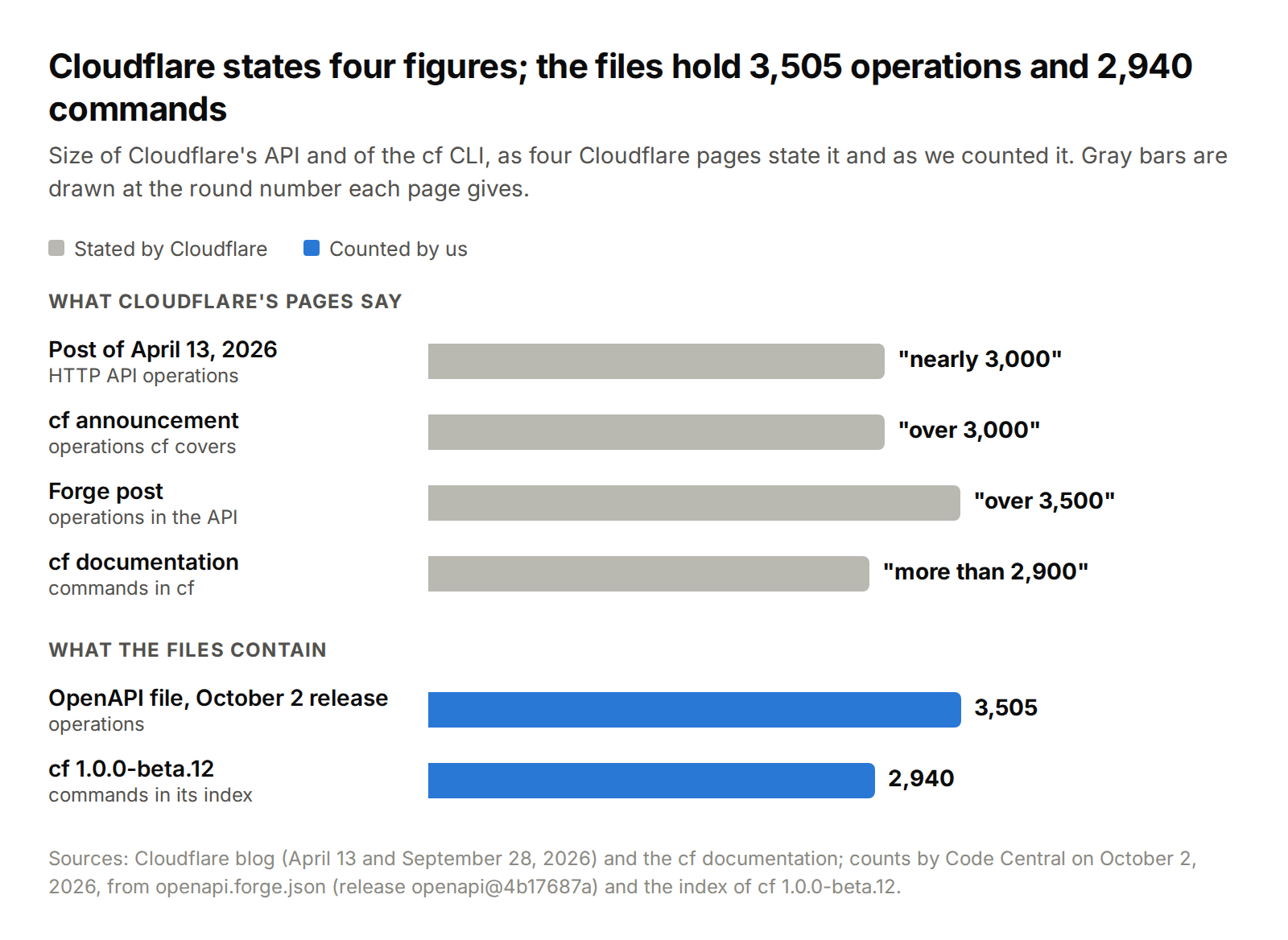
Compare the two blue bars with the four gray ones. By our count, the Forge post’s 3,500 is the size of the API, and the documentation’s 2,900 is the size of the CLI.
Advertisements
The first of our counts comes from openapi.forge.json, the specification that Forge’s repository attaches to its releases. This block downloads the release we used, openapi@4b17687a, and prints its number of paths and of operations:
Terminal (bash)
curl --silent --location --output openapi.forge.json "https://github.com/cloudflare/forge/releases/download/openapi%404b17687a10dce5f0f445780b010f06ebc5442401/openapi.forge.json"
node -e 'const m=["get","post","put","patch","delete"];const p=require("./openapi.forge.json").paths;console.log(Object.keys(p).length, Object.values(p).reduce((n,i)=>n+m.filter(k=>k in i).length,0))'It finds 3,505 operations across 2,208 paths:
Output
2208 3505The second count comes from the index that cf searches, a JSON file inside the installed package:
Terminal (bash)
node -e 'console.log(require("./node_modules/cf/dist/_meta/commands.json").commands.length)'The index has 2,940 commands:
Output
2940A second file in the same directory holds the API schema of 2,893 of them. The other 47 have no schema, and cf dev, cf build and cf migrate are among them.
618 operations have no command, and 270 of them are marked to be ignored
The pair to compare is 2,893 API commands against 3,505 operations. Those commands map to 2,890 distinct operations, and 3 of them are not in this release of the specification. To see which operations are missing, this script matches each API command in the index to an operation in the specification, by HTTP method and path:
Advertisements
Terminal (bash)
python3 - <<'PY'
import json, re
cmds = json.load(open('node_modules/cf/dist/_meta/commands.json'))['commands']
spec = json.load(open('openapi.forge.json'))
norm = lambda p: re.sub(r'\{[^}]*\}', '{}', p).rstrip('/')
ops = {(m, norm(p)): o for p, item in spec['paths'].items() for m, o in item.items() if m in ('get', 'post', 'put', 'patch', 'delete')}
pairs = {(c['httpMethod'].lower(), norm(c['apiPath'])) for c in cmds if c.get('httpMethod') and c.get('apiPath')}
missing = [o for k, o in ops.items() if k not in pairs]
ignored = sum(1 for o in missing if o.get('x-fern-ignore'))
deprecated = sum(1 for o in missing if o.get('deprecated') and not o.get('x-fern-ignore'))
print('operations', len(ops), 'with a command', len(ops) - len(missing), 'without', len(missing))
print('without a command: x-fern-ignore', ignored, 'deprecated', deprecated, 'neither', len(missing) - ignored - deprecated)
PYThe first line splits the operations, and the second splits the ones without a command:
Output
operations 3505 with a command 2887 without 618
without a command: x-fern-ignore 270 deprecated 207 neither 141Of the 3,505 operations, 2,887 have a command and 618 do not. Among the 618, 270 carry a field named x-fern-ignore in the specification, 207 more are marked as deprecated, and 141 have neither mark.
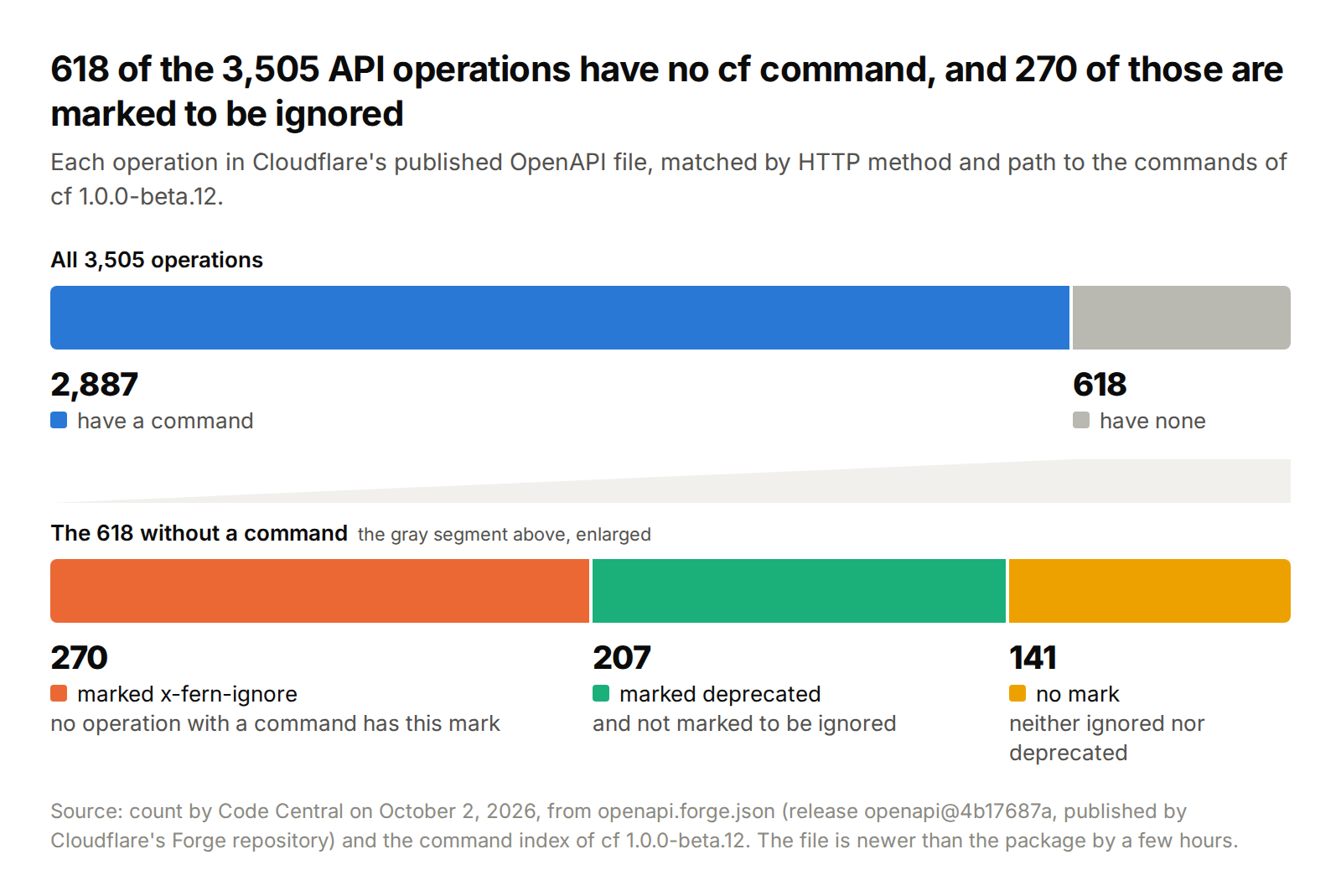
By our reading, the announcement’s “entirety of the Cloudflare API surface” overstates the package by those 618 operations. For 270 of them the cause is in the file: Cloudflare marked them to be ignored, and no operation with a command has that mark.
Deprecation explains less. It covers 207 more of the missing operations, and also 20 operations that do have a command.
Advertisements
Tested with: cf 1.0.0-beta.12 from npm, Node.js 24.11.0, Python 3.13.2 and bash 5.2 on WSL2, on October 2, 2026. Not checked: which release of the specification the package was built from. Ours was published later the same day, so some of the 141 may be newer than the package.
The announcement describes the short path, and the docs list the rest
The documentation says more than the announcement does. The table pairs what each one says on three points.
| Point | Announcement | Documentation |
|---|---|---|
| Migration | “Migrating a Worker from Wrangler is as simple as running” cf migrate | Durable Objects, Workflows and Containers need manual work, and cf migrate exits with status 1 until it is done |
| Output | JSON “pretty printed for humans and condensed for agents” | JSON output “is indented, whether or not standard output is a terminal” |
| Coverage | “the entirety of the Cloudflare API surface” | No live logs yet: they still run through npx wrangler tail |
On the bundler the two agree. The announcement says “Vite becomes default”, and also that a Worker that relies on Wrangler for esbuild keeps building with Wrangler. In the docs, cf migrate keeps Wrangler’s bundler unless the project already uses the Cloudflare Vite plugin.
Some Workers, the announcement adds, “may take more time” to migrate.
Output is indented JSON, in a terminal or not
We checked the output row. This command asks cf to print the request it would send, without sending it, and needs no login:
Advertisements
Terminal (bash)
npx cf d1 create --name my-database --dry-run | tee request.jsonThe output is indented JSON, although it went through a pipe and the shell belonged to a coding agent:
Response (JSON)
{
  "command": "cf d1 create",
  "method": "POST",
  "url": "https://api.cloudflare.com/client/v4/accounts/<account-id>/d1/database",
  "pathParams": {},
  "bodyKind": "json",
  "body": {
    "name": "my-database"
  }
}The source agrees with the docs’ page for coding agents. In cf’s repository, the function that formats JSON output indents with two spaces before it checks whether the output is a terminal.
Three habits from Wrangler that no longer hold
The docs’ page for Wrangler users lists more differences than the table above. Three of them change what a familiar command does:
- Resource commands take the ID that the API expects, where Wrangler took a name. A D1 command needs the database ID.
- Commands act on remote resources by default. The migration guide says
cf d1 migrations apply“applies migrations to the remote database unless you add--local“. - Environments become modes, and
--env stagingbecomes--mode staging.
cf also keeps its own credentials. The docs say it “does not reuse a Wrangler login”, so a deploy needs credentials of its own: cf auth login, or the CLOUDFLARE_API_TOKEN variable that the docs give for CI. The local steps need neither: of cf dev, cf build and cf deploy --dry-run, the migration guide says “None of these commands need you to sign in”.
Advertisements
By our reading, “as simple as running” describes a Worker that uses none of the things the guide marks as required items. Durable Objects, Workflows and Containers are among them, and of the first the guide says: “A project with Durable Objects always has required items”.
The package has a secrets command that the docs say is missing
On one point the docs are behind the package. The reference for Wrangler users says that cf “cannot set a single secret yet” and sends you to npx wrangler secret put.
The package we installed has cf workers secrets update in its index, and cf’s changelog lists it under 1.0.0-beta.4, the day of the launch. With --dry-run, it builds the request:
Advertisements
Terminal (bash)
npx cf workers secrets update API_KEY --worker my-worker --text example-value --type secret_text --dry-runThe request is a PUT to the Worker’s secrets:
Response (JSON)
{
  "command": "cf workers secrets update",
  "method": "PUT",
  "url": "https://api.cloudflare.com/client/v4/accounts/<account-id>/workers/scripts/my-worker/secrets",
  "pathParams": {
    "script-name": "my-worker"
  },
  "bodyKind": "json",
  "body": {
    "text": "example-value",
    "type": "secret_text",
    "name": "API_KEY"
  }
}On live logs, docs and package agree. The three operations under /workers/scripts/{script_name}/tails in the specification have no command.
cf migrate on Cloudflare’s chat demo stops with three required items
To see those required items, we migrated workers-chat-demo, Cloudflare’s own Durable Objects chat example. Its wrangler.toml declares two Durable Object classes, ChatRoom and RateLimiter, one migration that creates them, and a rule that loads HTML files as data. Its package.json declares no dependencies.
The first attempt is a dry run in a fresh clone:
Terminal (bash)
git clone --depth 1 https://github.com/cloudflare/workers-chat-demo.git
cd workers-chat-demo
cf migrate --dry-runIt stops before it lists anything:
Output
Using the Wrangler bundler because @cloudflare/vite-plugin is not declared. Pass --bundler vite to override.

┌ Error
│ Generating wrangler.config.ts requires wrangler 4.100.0 or newer because
│ earlier versions do not export wrangler/experimental-config. No local Wrangler
│ installation was found. Update Wrangler and retry the migration.
└Notice “local”. The guide says that with the Wrangler bundler, cf migrate “needs a local Wrangler installation, even for a dry run”, and this project declares none. After the migration, cf dev, cf build and cf deploy need Wrangler 4.136.0 or later.
By the same guide, cf migrate writes nothing while git status reports changes. So the next step adds Wrangler, commits, and runs the migration:
Advertisements
Terminal (bash)
npm install --save-dev wrangler
echo "node_modules/" >> .gitignore
git add package.json package-lock.json .gitignore
git commit -m "Add wrangler as a dev dependency"
cf migrateThe command writes four files and lists three items:
Output
Using the Wrangler bundler because @cloudflare/vite-plugin is not declared. Pass --bundler vite to override.
Updated 4 file(s):
├─ cloudflare.config.ts
├─ wrangler.config.ts
├─ package.json
└─ package-lock.json

Follow-up work:
├─ [required] durable_objects.bindings.0: Durable Object bindings require manual review after migration.
│  └─ https://developers.cloudflare.com/workers/runtime-apis/context/#exports
├─ [required] durable_objects.bindings.1: Durable Object bindings require manual review after migration.
│  └─ https://developers.cloudflare.com/workers/runtime-apis/context/#exports
└─ [required] migrations: Wrangler Durable Object migrations are unsupported. Replace them with an exports lifecycle declaration, for example `exports: { MyDurableObject: exports.durableObject({ storage: "sqlite" }) }`.
   └─ https://developers.cloudflare.com/workers/runtime-apis/context/#exports

⚠ Migration requires follow-up work.The exit status was 1. A script that treats a non-zero status as failure stops here, and the guide warns about that: “This does not mean that the migration failed.”
wrangler.toml is untouched, and package.json gains cf as a development dependency. The HTML rule moved to wrangler.config.ts, a file the guide calls experimental.
The generated file refuses to load until you edit it
The new cloudflare.config.ts has both bindings converted. Above them sits a throw statement; the ... lines stand for the TODO comments we left out:
Advertisements
TypeScript
import { bindings, defineConfig } from "cf/config";

...
throw new Error("Migration incomplete. Resolve every cf migrate TODO in `cloudflare.config.ts`.");

export default defineConfig({
	worker: {
		name: "edge-chat-demo",
		compatibilityDate: "2024-01-01",
		entrypoint: "src/chat.mjs",
		env: {
			rooms: bindings.durableObject({
				worker: "edge-chat-demo",
				exportName: "ChatRoom",
			}),
			limiters: bindings.durableObject({
				worker: "edge-chat-demo",
				exportName: "RateLimiter",
			}),
		},
		...
	},
});The throw is deliberate. With the file as generated, cf build exits with status 1 and prints Error: Migration incomplete. Resolve every cf migrate TODO in cloudflare.config.ts.
What is missing is the migration history. In cloudflare.config.ts, an exports entry per class replaces it.
The guide says to match the storage each class already uses, and this project created both with new_sqlite_classes. This is the whole file after our edit:
TypeScript
import { bindings, defineConfig, exports } from "cf/config";

export default defineConfig({
	worker: {
		name: "edge-chat-demo",
		compatibilityDate: "2024-01-01",
		entrypoint: "src/chat.mjs",
		env: {
			rooms: bindings.durableObject({
				worker: "edge-chat-demo",
				exportName: "ChatRoom",
			}),
			limiters: bindings.durableObject({
				worker: "edge-chat-demo",
				exportName: "RateLimiter",
			}),
		},
		exports: {
			ChatRoom: exports.durableObject({ storage: "sqlite" }),
			RateLimiter: exports.durableObject({ storage: "sqlite" }),
		},
	},
});After the edit, the build still runs on Wrangler
With the edit in place, a dry-run deploy checks the result without a Cloudflare login:
Terminal (bash)
cf deploy --dry-runIt builds, prints the bindings and uploads nothing:
Output
├  Build
│  Delegating to Wrangler
◆  Build complete
│
├  Deploy
│  Total Upload: 21.86 KiB / gzip: 6.54 KiB
│  Your Worker has access to the following bindings:
│  Binding                                                    Resource
│  env.rooms (ChatRoom, defined in edge-chat-demo)            Durable Object
│  env.limiters (RateLimiter, defined in edge-chat-demo)      Durable Object
│
│  --dry-run: exiting now.
│
◆ Dry run completeRead the second line: the build is still Wrangler’s. That is what the announcement describes for a Worker that relies on Wrangler for esbuild, where cf goes on to “delegate builds to Wrangler”.
Advertisements
Node.js also printed a MODULE_TYPELESS_PACKAGE_JSON warning each time cf loaded the configuration file. The guide’s fix is "type": "module" in package.json.
cf dev then served the chat page on port 8787. The edit is only proven when a request reaches one of the two classes.
In this demo, POST /api/room returns a new room ID without creating an object. So we asked for that room’s WebSocket endpoint with a plain HTTP request:
Advertisements
Terminal (bash)
ROOM=$(curl --silent --request POST http://localhost:8787/api/room)
curl --silent --write-out "\nHTTP %{http_code}\n" "http://localhost:8787/api/room/$ROOM/websocket"The request fails, and the failure is the proof:
Output
expected websocket
HTTP 400That text comes from the fetch method of the ChatRoom class in the demo’s source. The object started under the configuration we wrote by hand.
In an unmigrated project, cf build asks to migrate, and Enter says yes
The docs warn about the opposite order, and they include continuous integration (CI): “Do not run cf dev, cf build, or cf deploy in a Wrangler project, including from CI, until you have run cf migrate.”
What the command does depends on whether it has a terminal. We ran it in a second clone, with Wrangler installed and no migration:
Advertisements
Terminal (bash)
cf buildIn a terminal, cf asks before it builds:
Output
◆  A Wrangler config was found at wrangler.toml. Run cf migrate before continuing?
│ ● Yes / ○ No“Yes” is the selected answer. Pressing Enter installed cf in the project and ran the migration, and git status then showed the same four files as in the run above. cf’s changelog dates the prompt to 1.0.0-beta.4.
Without a terminal, cf does not ask. The changelog says: “Non-interactive runs do not migrate automatically.” Under our coding agent, cf build failed with cloudflare.config.ts is required when --experimental-new-config is enabled. and git status showed no changes. We passed no such flag: the message is in the code of the Wrangler that cf calls.
For other project shapes, the docs describe a different outcome. In a project with the Cloudflare Vite plugin, or with a static assets directory, the same command writes a new configuration without your bindings. In CI it does that without asking.
Advertisements
Tested with: cf 1.0.0-beta.12, Wrangler 4.147.0, Node.js 24.11.0 and npm 11.6.1 on WSL2 (Linux 5.15), on October 2, 2026, in the shell of a coding agent; the prompt of cf build was captured in a pseudo-terminal. Not run: anything against a Cloudflare account, including login, a real deploy and cf workers secrets update without --dry-run; --bundler vite; a project with environments, Workflows or Containers; macOS and Windows.
Forge’s repository generates SDKs with Fern
The Forge post describes “an open source, pluggable generation pipeline that anyone can deploy and run for free”, with generators for CLIs, software development kits (SDKs) and docs.
On October 2, 2026 the repository had four commits, the first one named “Initial public release of Forge” and dated September 28. The README at the root is nine lines long and has no usage instructions.
Advertisements
A package named forge describes itself as “the plugin host for code-generation transformers”. The code that emits cf’s command files is one such transformer, and it lives in cf’s repository.
Of the 15 packages, one declares a command. Its description is “Generate a Cloudflare TypeScript SDK from a complete bundled OpenAPI specification”. Two other paths come with instructions: the documentation site’s README has a “Run it” section, and a script generates the SDKs of the other languages.
That generation is done by Fern, a separate project whose README describes “a platform that transforms your API definitions into production-ready SDKs”. Forge’s configuration file lists nine fernapi/* generators, from fern-typescript-sdk to fern-rust-sdk.
Advertisements
The help text of the command says that a specification passed to it “uses sharded Fern generation” and requires Docker. The Forge post does not mention Fern.
Forge is not on npm either. The three package names we tried return 404, and cf’s repository says the Forge code is “vendored as a tarball in vendor/ until it is on npm”.
Running Forge on a four-operation API
We ran the command on a specification of our own, a notes API with four operations. This is the whole file, notes-openapi.json:
Advertisements
Response (JSON)
{
  "openapi": "3.0.3",
  "info": { "title": "Notes API", "version": "1.0.0" },
  "servers": [{ "url": "https://notes.example.com/v1" }],
  "paths": {
    "/notes": {
      "get": {
        "operationId": "notes-list", "summary": "List notes", "tags": ["Notes"],
        "parameters": [{ "name": "limit", "in": "query", "schema": { "type": "integer", "minimum": 1, "maximum": 100 } }],
        "responses": { "200": { "description": "A page of notes", "content": { "application/json": { "schema": { "type": "array", "items": { "$ref": "#/components/schemas/Note" } } } } } }
      },
      "post": {
        "operationId": "notes-create", "summary": "Create a note", "tags": ["Notes"],
        "requestBody": { "required": true, "content": { "application/json": { "schema": { "$ref": "#/components/schemas/NoteInput" } } } },
        "responses": { "201": { "description": "The created note", "content": { "application/json": { "schema": { "$ref": "#/components/schemas/Note" } } } } }
      }
    },
    "/notes/{note_id}": {
      "get": {
        "operationId": "notes-get", "summary": "Get a note", "tags": ["Notes"],
        "parameters": [{ "name": "note_id", "in": "path", "required": true, "schema": { "type": "string" } }],
        "responses": { "200": { "description": "The note", "content": { "application/json": { "schema": { "$ref": "#/components/schemas/Note" } } } } }
      },
      "delete": {
        "operationId": "notes-delete", "summary": "Delete a note", "tags": ["Notes"],
        "parameters": [{ "name": "note_id", "in": "path", "required": true, "schema": { "type": "string" } }],
        "responses": { "204": { "description": "Deleted" } }
      }
    }
  },
  "components": {
    "schemas": {
      "Note": {
        "type": "object", "required": ["id", "title", "created_at"],
        "properties": { "id": { "type": "string" }, "title": { "type": "string" }, "body": { "type": "string" }, "created_at": { "type": "string", "format": "date-time" } }
      },
      "NoteInput": {
        "type": "object", "required": ["title"],
        "properties": { "title": { "type": "string" }, "body": { "type": "string" } }
      }
    }
  }
}The package does not build from a fresh clone. Its build script reads two openapi.json files that the repository’s .gitignore excludes, and it stopped with ENOENT. We gave it the openapi.forge.json downloaded earlier, in both places, and built again:
Terminal (bash)
git clone --depth 1 https://github.com/cloudflare/forge.git
cp openapi.forge.json forge/openapi.json
cp openapi.forge.json forge/packages/cloudflare-fern-config/fern/openapi.json
cd forge
pnpm install --frozen-lockfile
pnpm --filter @cloudflare/forge-transformer-sdk-ts buildWith the build done, the command takes the notes file and an output directory:
Terminal (bash)
node packages/cloudflare-forge-transformer-sdk-ts/dist/cli.js ../notes-openapi.json --out ../forge-outIt pulls Fern’s TypeScript generator image, runs it in three shards, and ends with a summary; the ... stands for the lines before it:
Output
...
generate-sdk-map: wrote 4 entr(ies) to /tmp/forge-transformer-sdk-ts-h35R7y/sdk/sdk-map.json
  endpoints parsed: 4
  expected non-ignored ops: 4
  alias collisions resolved: 0
  unmatched generated methods: 0
unresolved spec ops: 0All four operations became methods. The sdk directory in the output has 62 files: a TypeScript client with list, create, get and delete on a notes resource, and an sdk-map.json that ties each operationId to its method.
Advertisements
The generator still carries Cloudflare’s names. Our notes SDK came out with error classes named CloudflareApiError and CloudflareApiTimeoutError.
Nor does the script use Fern’s image as published. Its log says it patched the image and “retagged fernapi/fern-typescript-sdk:3.80.1”, so the image with that name on our machine is now Cloudflare’s variant.
By our reading, the plugin host of the post is public as source code, and the path we ran is one step of the pipeline: the TypeScript SDK, through Fern’s generator. A command for the whole pipeline and an npm package are what is missing. Forge’s README calls the project “still early-days” and says other targets come “in short order”.
Tested with: Forge at commit 86cb1ef, pnpm 10.27.0, Node.js 24.11.0 and Docker 29.7.2 on WSL2, on October 2, 2026. Not run: Forge on Cloudflare’s full specification, any target other than TypeScript, and the documentation site.
Advertisements
Before you run cf in a Wrangler project
You do not have to migrate to start using cf. The docs say its resource and account commands work in any directory, next to a Wrangler project, without changing it. Until you migrate, development and deployment stay on wrangler dev and wrangler deploy.
If an agent drives your terminal, look at what the search returns before the agent acts on it. Cloudflare’s docs show cf cli search "create D1 database" returning cf d1 create first, and it did for us.
With one more word, cf cli search "create a D1 database", the first match was cf d1 migrations apply. That is the command that writes to the remote database by default.
Advertisements
Adding --dry-run to an API command prints the request without sending it. Do that before a write.
If cf goes into a script, read exit codes with care in both directions. cf migrate exits with 1 after a migration that only needs follow-up. In a session without a terminal, a destructive command without --force prints Aborted. and exits with 0. The docs say of it: “A successful exit does not mean the resource was deleted.”
And keep Wrangler around. Live logs still need npx wrangler tail, and Wrangler does not read cloudflare.config.ts, so the old configuration file stays until you no longer run that command.
cf also collects anonymous usage telemetry unless you turn it off. The docs’ table of environment variables says that with nothing set, cf “uses its saved telemetry preference or enables telemetry”. Setting DO_NOT_TRACK=1 disables it, and so does cf cli telemetry disable.
Advertisements
The beta has no end date, and Forge has no npm package
The 18 months of Wrangler maintenance run from the end of the beta, and no page we read dates it. By our reading, a stable 1.0.0 on npm is the likeliest sign of that end, since the docs speak of “the stable release”. Forge is not on npm yet, and cf is still moving: thirteen betas shipped between September 25 and October 2.
Related posts:
 Google Cuts One-Third of Managers in Move to Streamline Its Organizational Structure
 A New DeepSeek Paper Highlights the Growing Push for More Efficient AI Training
 OpenAI Launches ChatGPT Health: New AI Tool Focused on Healthcare with Reinforced Privacy
 Claude Cowork: Anthropic Introduces an AI Agent That Works Directly With Your Files
 Claude Opus 5.5 vs GPT-6 Sol and Luna: prices, benchmarks, platforms
 Go 1.27 simd package: portable SIMD benchmarked on AVX2