English


Next.js Server Side Rendering (SSR): How It Works, When to Use It, and How to Implement It (App Router + Pages Router)

If you searched for nextjs server side rendering, chances are you landed on one of two things:
- The official docs (accurate, but not always practical end-to-end)
- Reddit/StackOverflow threads (practical pain, but scattered answers)
This guide is the “production version”: what SSR means in Next.js today, how it differs between Pages Router and App Router, and the exact patterns you can paste into real apps—without accidentally blowing up your caching strategy.
What “SSR” actually means in Next.js
SSR vs CSR vs SSG vs ISR (30-second definitions)
- SSR (Server-Side Rendering): the server generates HTML on each request.
- CSR (Client-Side Rendering): the browser renders the UI after downloading JavaScript (often you see loaders first).
- SSG (Static Site Generation): HTML is generated at build time.
- ISR (Incremental Static Regeneration): pages are mostly static, but they can be regenerated after a time window.
That’s the classic definition… but in modern Next.js, SSR is tightly tied to caching—especially in the App Router.
Why the App Router changed the SSR conversation
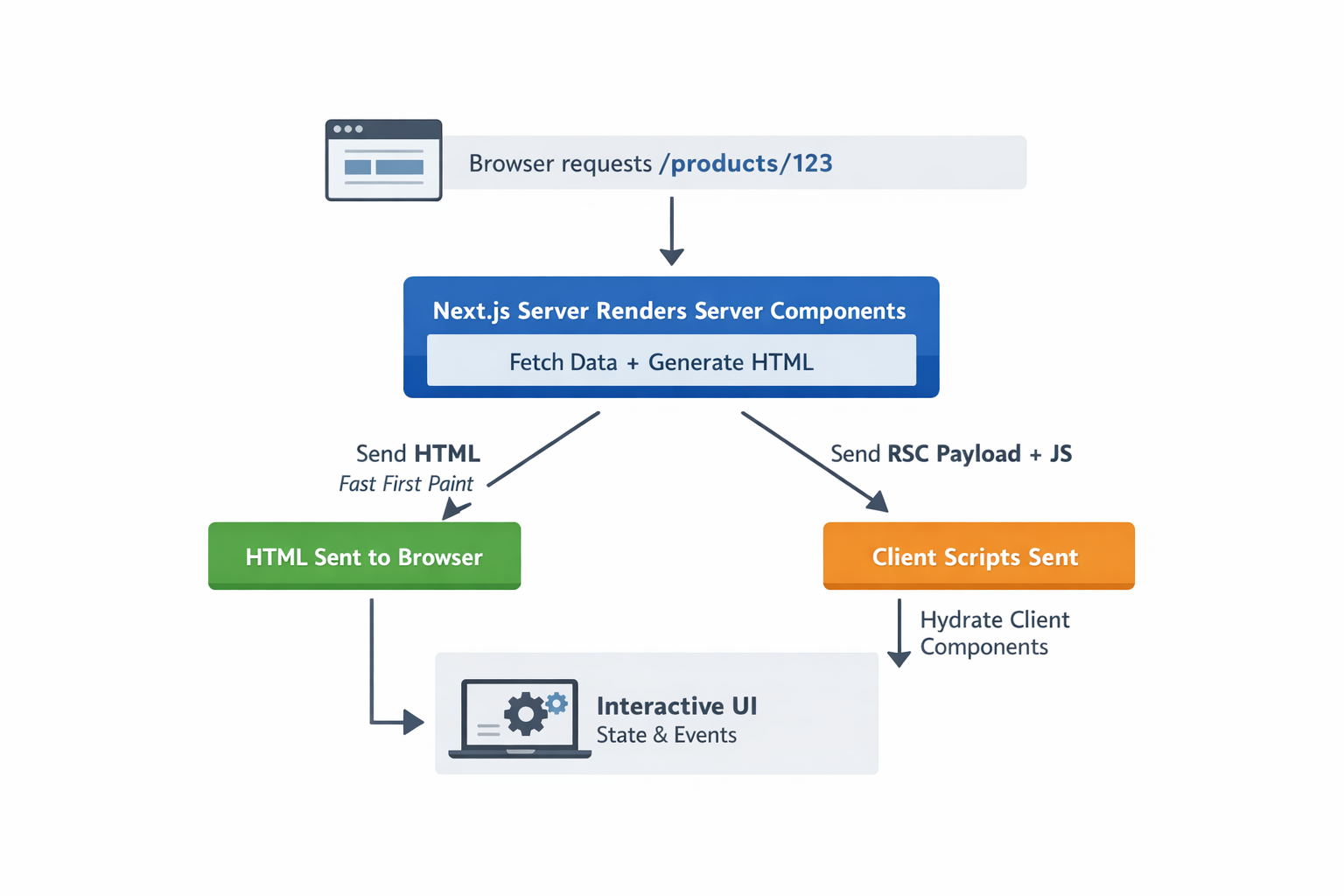
In the App Router, your route files are Server Components by default. That means server rendering isn’t a special “mode” you switch on. It’s the baseline.
Then you opt into client-side interactivity with a Client Component by adding "use client" at the top of the file.
Here’s the mental model I use:
- Server Components: fetch data securely, render markup, keep sensitive logic server-only
- Client Components: state, event handlers, UI interactivity
Important: a Client Component does not mean “no SSR.” It means “this part needs JavaScript in the browser to become interactive.” The first load can still be pre-rendered and then hydrated.
Why SSR exists (the real motivations)
SSR is not a religion. It’s a tool. Use it when it solves an actual problem.
SSR is great for…
- SEO and previews: content is available as HTML early, which helps crawlers and social scrapers.
- Better first impression: fewer “blank page + loading spinner” moments.
- Request-time personalization: content based on cookies, headers, sessions.
SSR can hurt when…
- You make everything dynamic and your server becomes the bottleneck.
- You force dynamic rendering everywhere and accidentally disable caching opportunities.
That’s why in real production apps, the winning strategy is usually hybrid.
When to use SSR in Next.js (a decision framework)
Use SSR when…
- The data must be fresh on every request (prices, availability, real-time-ish content).
- The page depends on request-time identity (auth/session/cookies).
- SEO/share previews are core to the page.
Don’t use SSR when…
- The page barely changes → prefer SSG/ISR (cheaper + often faster).
- Interactivity dominates and SEO doesn’t matter → CSR islands might be simpler.
Rule of thumb: default to static, go dynamic only where you must.
SSR in the Pages Router (classic Next.js SSR)
In the Pages Router, SSR is straightforward: getServerSideProps runs on every request and Next pre-renders HTML using the returned props.
Minimal getServerSideProps example
TSX
// pages/products/[id].tsx
import type { GetServerSideProps } from "next";

export const getServerSideProps: GetServerSideProps = async (ctx) => {
  const { id } = ctx.params as { id: string };

  const res = await fetch(`https://api.example.com/products/${id}`);
  if (!res.ok) return { notFound: true };

  const product = await res.json();
  return { props: { product } };
};

export default function ProductPage({ product }: any) {
  return (
    <main>
      <h1>{product.name}</h1>
      <p>${product.price}</p>
    </main>
  );
}If you learned SSR years ago, this is the mental model you’re expecting:
request → server fetch → server render → HTML response.
SSR in the App Router (modern Next.js SSR)
This is where most confusion happens, because in the App Router, SSR is basically about:
- whether the route is static or dynamic
- how your data fetches interact with caching
Next.js’ caching guide says routes are rendered at request time (dynamic) when you use request-specific data like:
cookies(),headers(),searchParamsunstable_noStorefetchwith{ cache: 'no-store' }
Also important: even if a route is dynamic (request-time rendering), it can still use the Data Cache for specific fetches.
The “getServerSideProps equivalent” in App Router
In App Router, you fetch in the Server Component and opt into request-time freshness using cache: "no-store" (or revalidate: 0).
TSX
// app/products/[id]/page.tsx
export default async function ProductPage({
  params,
}: {
  params: { id: string };
}) {
  const res = await fetch(`https://api.example.com/products/${params.id}`, {
    cache: "no-store",
  });

  if (!res.ok) {
    // In real apps you might render an error UI or throw
    return <div>Failed to load product.</div>;
  }

  const product = await res.json();

  return (
    <main>
      <h1>{product.name}</h1>
      <p>${product.price}</p>
    </main>
  );
}This pattern is “classic SSR energy”: fresh data every request.
SSR + client interactivity (the pattern people ask about nonstop)
This is the most common real-world setup:
- Server: fetch initial data (fast, secure, SEO-friendly)
- Client: store it in state, update it with interactions
Server page → Client component (clean split)
TSX
// app/about/page.tsx (Server Component)
import AboutClient from "./AboutClient";

export default async function Page() {
  const res = await fetch("https://api.example.com/myData", { cache: "no-store" });
  const initialData = await res.json();

  return <AboutClient initialData={initialData} />;
}

// app/about/AboutClient.tsx (Client Component)
"use client";

import { useState } from "react";

export default function AboutClient({ initialData }: { initialData: any[] }) {
  const [data, setData] = useState(initialData);

  async function addItem() {
    const res = await fetch("/api/addData", { method: "POST" });
    const newItem = await res.json();
    setData((prev) => [...prev, newItem]);
  }

  return (
    <section>
      <button onClick={addItem}>Add item</button>
      <pre>{JSON.stringify(data, null, 2)}</pre>
    </section>
  );
}
If you keep just one principle in your head, make it this:
Server Components are for data + markup. Client Components are for state + events.
Forcing dynamic rendering (use this sparingly)
Sometimes you want a route to behave like “always SSR” without thinking too hard.
You can force it at the segment level:
TSX
// app/products/[id]/page.tsx
export const dynamic = "force-dynamic";

export default async function Page() {
  // ...
}This is convenient, but it can kill caching opportunities if you apply it broadly. I’d use it only when:
- the whole route is truly request-dependent, or
- you’re debugging, and you want to eliminate caching variables first
Hybrid SSR (the money section)
Most production apps don’t need “everything fresh every request”.
A better approach is often:
- One fetch: fresh every request (
no-store) - Another fetch: cached/revalidated (
revalidate: 3600)
Example: fresh price + cached reviews
TSX
// app/products/[id]/page.tsx
export default async function ProductPage({ params }: { params: { id: string } }) {
  const productRes = await fetch(`https://api.example.com/products/${params.id}`, {
    cache: "no-store", // price/availability changes often
  });

  const reviewsRes = await fetch(`https://api.example.com/products/${params.id}/reviews`, {
    next: { revalidate: 3600 }, // reviews can be 1h stale
  });

  const [product, reviews] = await Promise.all([productRes.json(), reviewsRes.json()]);

  return (
    <main>
      <h1>{product.name}</h1>
      <p>${product.price}</p>

      <h2>Reviews</h2>
      <ul>
        {reviews.map((r: any) => (
          <li key={r.id}>{r.title}</li>
        ))}
      </ul>
    </main>
  );
}This is usually where you win:
- fresh where it matters
- cached where it doesn’t
- good UX without burning money
Debugging: “why is my route not behaving like SSR?”
If your mental model says “this should be SSR” but reality disagrees, check these first:
- Are you actually using
cache: "no-store"on the fetch that matters? - Are you using cookies/headers/searchParams? That can push routes into request-time rendering.
- Did you force dynamic rendering by accident? (
dynamic = "force-dynamic"orrevalidate = 0) - Are you mixing server and client logic in one place? Move state/event code behind
"use client".
FAQ
What is Next.js server-side rendering?
SSR in Next.js means HTML is generated on the server. In the Pages Router, it’s typically done via getServerSideProps. In the App Router, it usually maps to “dynamic rendering” controlled by request-time APIs and fetch caching.
Does "use client" disable SSR?
No. It creates a client boundary so that component can run in the browser. The page can still be pre-rendered and then hydrated.
What’s the App Router equivalent of getServerSideProps?
A Server Component that fetches request-time data, typically using fetch(..., { cache: "no-store" }) (or revalidate: 0).
Is SSR always faster than CSR?
Not always. SSR often improves perceived speed (content appears earlier), but it can increase server cost and TTFB if overused. Hybrid is usually the sweet spot.
Wrap-up: pick the right strategy (fast checklist)
- Mostly static content → SSG/ISR
- Needs request-time identity → SSR / dynamic rendering
- Needs interactivity → Client Components
- Needs freshness in one piece → hybrid fetch strategy
If you want SSR that performs well, don’t aim for “everything dynamic.” Aim for dynamic where it matters, cached everywhere else.

Ashley Irving is a software engineer and MIT Computer Science graduate. She focuses on building scalable web applications and writes about software engineering, architecture, and modern development practices.